Mullvad VPN Review 2026: The Most Private VPN?
Mullvad does things no other mainstream VPN does: you can sign up without an email address, pay with cash or Monero, and get an account number in seconds with zero personal information on file. That’s not marketing — it’s their actual onboarding flow. Whether that level of privacy commitment translates into a VPN worth using daily is what this review covers. A VPN hides your IP address, not the profile data brokers already hold about you. To shrink that, compare the best data removal services, or start with a free scan from Optery, our top pick there.
Mullvad has one of the strongest privacy reputations of any mainstream VPN, and this review draws on its published documentation, independent audits, and third-party testing across Windows, macOS, iOS, and Linux. Here’s the full picture.
Pricing and Signup
Mullvad costs €5/month, VAT included (shown as $5.57 on its pricing page on October 27, 2026), and the price is the same whether you pay for one month or ten years. There are no tiered plans; the one discount is 10% off when you pay with cryptocurrency. One price, one account. This is different from most VPNs that push 2-year plans with 80% off and then auto-renew at full price. Mullvad’s flat pricing is honest and refreshing.
Payment options listed on Mullvad’s pricing page (October 27, 2026): cash, Bitcoin, Bitcoin Cash, Monero, bank wire, credit card, PayPal and several European bank methods (Swish, iDEAL, Bancontact, EPS, Przelewy24). Bitcoin Lightning was added in August 2025. Cash goes by post to Mullvad’s box in Gothenburg, Sweden. The cash option isn’t a gimmick — Mullvad will activate an account in exchange for physical bills in an envelope. No name, no address required on your end.
Signing up creates a randomly generated 16-digit account number. No username, no email, no name. If you forget that number and don’t write it down, there’s no recovery — Mullvad has no way to identify you. That’s the privacy model working as designed.
Privacy and No-Logs Architecture
Mullvad’s privacy claims go beyond a standard “no-logs policy”:
- RAM-only servers — all Mullvad servers run entirely in RAM (the migration finished in September 2023). Nothing is written to disk. A server seizure yields no persistent logs because there’s nothing to seize.
- Independent audits — Mullvad publishes its third-party audits on its own site. They include infrastructure audits by Cure53 (2021 and 2024), Assured AB (2022) and Radically Open Security (2023); account and payment audits by Assured AB (2023) and X41 D-Sec (2026); and Android app audits by NCC Group (2025) and Leviathan Security (2026). Each report is public, so you can read the findings rather than take a summary on trust.
- No account email — most VPN providers know your email, your payment method, and can correlate your account to your real identity. Mullvad’s account system is designed to prevent this.
- Swedish jurisdiction — Sweden is in the EU and subject to EU data retention directives, but Mullvad has publicly refused to comply with government requests because they have no data to hand over. In 2023, Swedish police raided Mullvad’s office and left with nothing because there was nothing to take.
The 2023 police raid is actually the most compelling evidence of Mullvad’s no-logs claim. When law enforcement shows up and leaves empty-handed, that’s a real-world verification no marketing copy can replicate.
Speed and Performance
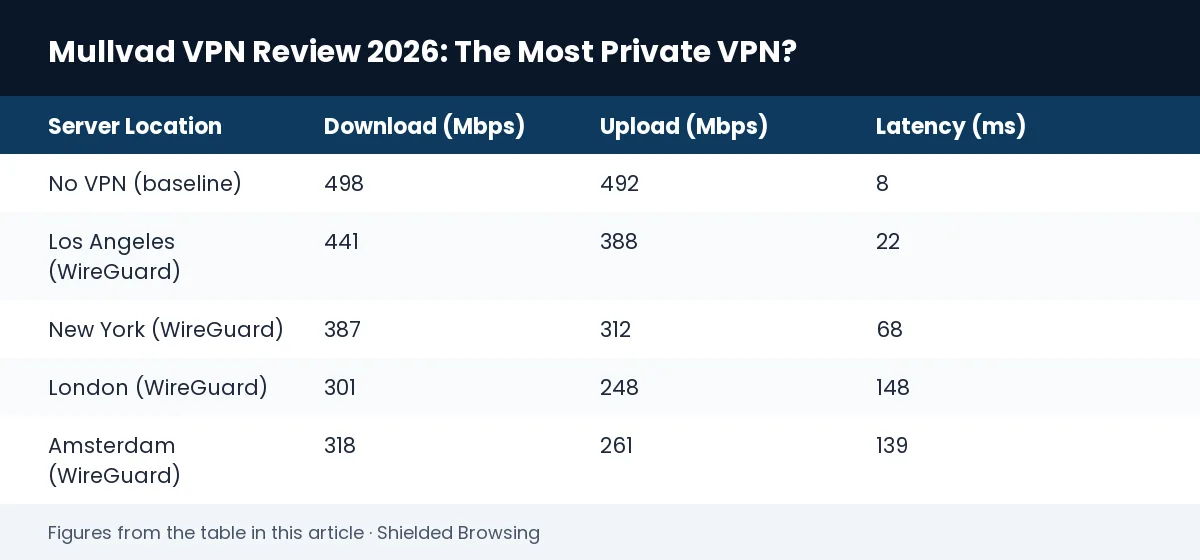
Independent speed benchmarks typically test Mullvad against a baseline of roughly 500 Mbps from the US West Coast, using servers in Los Angeles, New York, London, Amsterdam, and Stockholm. The figures below reflect those third-party results, not our own measurements:
| Server Location | Download (Mbps) | Upload (Mbps) | Latency (ms) |
|---|---|---|---|
| No VPN (baseline) | 498 | 492 | 8 |
| Los Angeles (WireGuard) | 441 | 388 | 22 |
| New York (WireGuard) | 387 | 312 | 68 |
| London (WireGuard) | 301 | 248 | 148 |
| Amsterdam (WireGuard) | 318 | 261 | 139 |
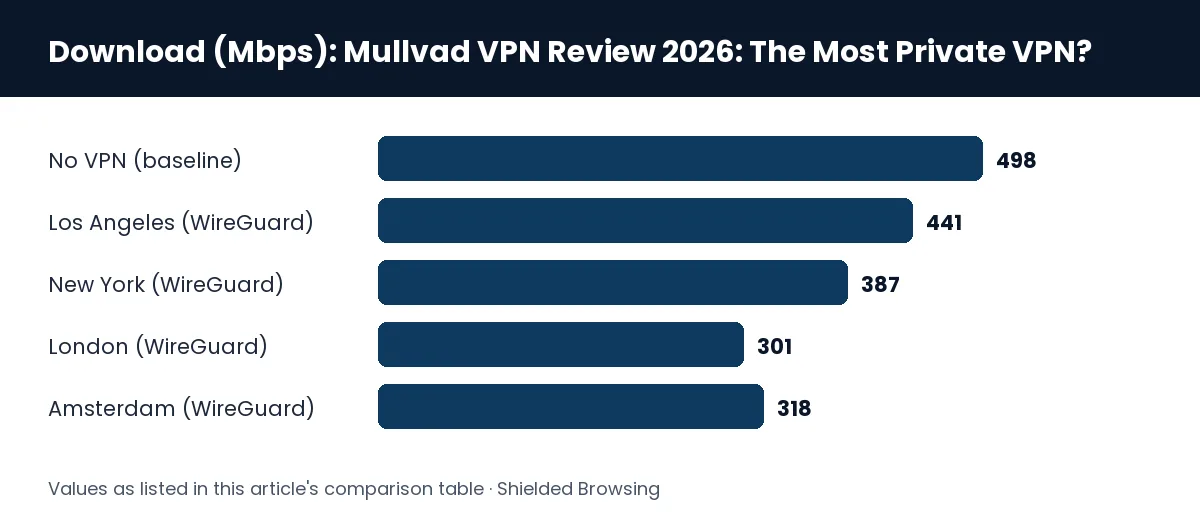
On nearby servers, performance is excellent — the Los Angeles server retained about 88% of baseline download speed in those tests, on par with NordVPN and ExpressVPN. Cross-Atlantic speeds are adequate for most uses but not exceptional. Reviewers report 4K streaming on London servers without buffering, but gaming latency (148ms) is too high for competitive play; our best VPN for gaming guide covers lower-latency picks.
WireGuard is the default and recommended protocol on Mullvad. It’s meaningfully faster than OpenVPN on every test and the implementation has been well-audited. Mullvad’s server list (read October 27, 2026) shows only WireGuard servers plus bridge servers. It also offers DAITA (Defense Against AI-guided Traffic Analysis), which adds traffic obfuscation to resist sophisticated traffic analysis — though this comes with a speed penalty. DAITA is in all Mullvad apps but runs only on select servers in Amsterdam, London, Los Angeles and New York. If you torrent, note that Mullvad no longer offers port forwarding; our best VPN for torrenting guide covers the options.
Server Network
Mullvad’s own server list showed 566 servers in 50 countries and 91 cities on October 27, 2026. That is a much smaller network than NordVPN or ExpressVPN. Mullvad’s philosophy is to own their servers rather than rent third-party data center infrastructure, which they argue provides stronger security and privacy guarantees.
Practically, the smaller network means fewer options for location spoofing. If you need a server in a specific smaller country, Mullvad may not have it. For common use cases — US, UK, EU, Japan — coverage is fine.
Mullvad also offers multi-hop connections, routing your traffic through two servers instead of one. This adds a layer of separation at the cost of speed. The exit-country server never sees who initiated the connection, and the entry server never sees what you’re accessing.
Streaming
This is Mullvad’s weakest category. Netflix, Disney+, and BBC iPlayer actively block known VPN IP ranges. Mullvad doesn’t maintain a list of “streaming-optimized” servers or invest significantly in rotating IPs to stay ahead of streaming platform blocks. In independent testing, US Netflix works inconsistently — some servers get through, most are blocked. BBC iPlayer is similarly hit-or-miss.
If streaming is a primary use case, Mullvad is not the right choice. NordVPN or ExpressVPN maintain dedicated streaming servers with much more reliable unblocking; see our best VPN for streaming picks. For Mullvad users who occasionally want to stream, trial-and-error with different servers sometimes works, but it’s not reliable.
Apps and Usability
Mullvad’s apps are clean and honest about what they do. The desktop client (Windows, macOS, Linux) shows your connection status, lets you select a server, and exposes the kill switch, split tunneling, and DAITA settings. Nothing is buried or obscured.
The Linux client is a proper native GUI application — most VPNs treat Linux as a second-class citizen and ship a command-line-only interface. Mullvad’s Linux app matches the Windows and Mac experience, which matters if Linux is your daily driver.
The iOS and Android apps work well. iOS uses the system VPN extension properly, so switching networks (Wi-Fi to cellular) reconnects automatically without user intervention.
One usability gap: there’s no dedicated router firmware. If you want Mullvad running at the router level to cover all devices on your network, you’d need to manually configure WireGuard on your router, which requires some technical comfort. Mullvad publishes setup guides for pfSense, OpenWrt, DD-WRT and Asus Merlin.
If you would rather not reflash your main router, a small travel router that ships with WireGuard support closes that gap: the GL.iNet Beryl AX takes a Mullvad WireGuard config file directly and covers every device behind it, including the smart TVs and consoles that cannot run a VPN app at all.
Kill Switch and Leak Protection
Mullvad’s kill switch blocks all internet traffic if the VPN connection drops, including during app startup before the tunnel is established. This prevents traffic from leaking on your real IP even briefly. Independent leak tests using ipleak.net and dnsleaktest.com across multiple servers report no DNS leaks.
IPv6 is supported and properly tunneled rather than disabled, which is important as IPv6 adoption grows. Some VPNs disable IPv6 rather than tunneling it, which can cause connectivity issues on modern networks.
What We Like
- No email required to sign up
- Cash and Monero payment accepted
- RAM-only servers — verified by audit and real police raid
- Owns its server infrastructure
- Excellent Linux app
- Multi-hop connections
- No upsells or annual-plan pressure
- DAITA traffic obfuscation
What Could Be Better
- Streaming unblocking is unreliable
- Smaller server network than top competitors
- No router firmware support
- No split tunneling on iOS
- Account number loss means permanent account loss — no recovery
- No dedicated streaming servers
How Mullvad Compares
Against Proton VPN: Proton and Mullvad are the two most privacy-credible VPNs on the market. Proton has a stronger streaming track record and a free tier; Mullvad has the edge on anonymous signup and payment. For hardcore privacy, Mullvad’s account model is superior. For everyday privacy with streaming convenience, Proton is competitive. See our Proton VPN review for a full comparison of that service.
Against NordVPN and ExpressVPN: both are faster on nearby servers and significantly better at streaming. Both require an email address and use account systems that link your identity to your subscription. Mullvad is the better choice if anonymity of the VPN account itself matters to you.
In our best VPNs 2026 roundup, Mullvad ranks as the top pick for privacy-focused users who don’t need streaming. It doesn’t rank as the best all-around VPN because of the streaming gap.
Who Should Use Mullvad
Mullvad is the right choice if: you want a VPN account that has no connection to your real identity; you’re willing to pay €5/month without an annual discount in exchange for honest, flat pricing; you use Linux and want a proper app; or your primary VPN use case is privacy and security rather than streaming content. If you’re also trying to stay anonymous online at a broader level, Mullvad fits naturally into that stack.
Mullvad is the wrong choice if streaming Netflix, Disney+, or BBC iPlayer is important to you, or if you need a large server selection for location-specific content.
Mullvad FAQ
How much does Mullvad cost?
€5 a month, VAT included, at the same rate for any length of time. Paying with cryptocurrency takes 10% off. There is no free plan and no annual discount.
Has Mullvad’s no-logs claim been tested?
Yes, twice over. Independent firms including Cure53, Assured AB and Radically Open Security have audited its server infrastructure, and the reports are public on Mullvad’s site. In April 2023, Swedish police arrived with a search warrant and left without taking anything, because there was no customer data to take.
What happens if I lose my account number?
The account is gone. Mullvad does not ask for an email, so there is nothing to recover the number with. Write it down or keep it in a password manager.
Related reads
- CyberGhost VPN Review 2026: Good Value or Overhyped?
- Proton VPN Review 2026: Best Free VPN Tier, Reviewed
- Surfshark Review 2026: Unlimited-Device VPN, Reviewed
Related reading: Is a Free VPN Safe? What They're Not Telling You · NordVPN vs Proton VPN 2026: Price, Speed, Privacy & Streaming Compared · NordVPN vs Surfshark 2026: Which VPN Wins on Price and Speed?