How to Remove Personal Information from Google (2026): 5 Free Steps
This page has no affiliate links. Every service named below is a plain link, and we earn nothing if you sign up. See our affiliate disclosure.
The short version: you can remove personal information from Google for free, but you are removing a search result, not the page itself. Google’s own help page says plainly that it “can only remove things from Google Search results.” So the job has two halves: get Google to drop the result, and get the site that holds your data (usually a people-search or data-broker site) to delete it at the source. This guide covers both in the order that saves the most time.
Every tool, form and policy below was read on Google’s own help pages on October 21, 2026, and the service prices on each company’s own pricing page the same day. We do not test removal services ourselves, so nothing here claims how well a tool will work for you.
On this page
- What Google will and won’t remove
- Step 1: Turn on “Results about you”
- Step 2: Use the removal request form for everything else
- Step 3: Remove it at the source
- Step 4: Clear stale results with “Refresh outdated content”
- Step 5: Decide whether a paid removal service is worth it
- Common mistakes to avoid
- FAQ
What Google will and won’t remove
Google’s personal-information policy lists the kinds of content it will consider removing from Search when they appear about you:
- Your home address, phone number or email address
- Confidential government ID numbers, such as a Social Security or tax ID number
- Bank account or credit card numbers
- Images of your signature or ID documents
- Private records such as medical records
- Confidential usernames and passwords
- Doxxing: your contact details shared alongside threats, or a large amount of your personal information gathered together with no legitimate purpose
There are separate policies for explicit images shared without consent and for content involving anyone under 18.
What it usually won’t remove is content that is newsworthy or of public interest. Google’s “Results about you” help page also says it won’t remove results from valuable public sources such as government sites, educational sites and newspapers. If a local paper wrote about you, this process probably won’t touch it.
Removal can also be partial. Google’s policy page describes two outcomes. In a full removal, the page stops appearing in Google Search at all. In a partial removal, it stops appearing for searches of your name or other identifier but can still show for other searches. In both cases the page stays live on the original site, and it can still turn up in Bing, DuckDuckGo, social media or anywhere else it’s linked.
Step 1: Turn on “Results about you”
“Results about you” is Google’s built-in tool for this exact job. You tell it your name and contact details, it checks Search for results that show them, and you can ask for those results to be removed from inside the same screen.
How to open it
- On a computer: go to myactivity.google.com/results-about-you while signed in to your Google account.
- In the Google app: tap your profile picture or initial, then choose “Results about you” from the menu.
What to enter
Add your name and every version of your contact details you want watched: nicknames, a maiden name, and each phone number, home address and email you have used. Google’s help page says the tool can also take government ID numbers, including Social Security, passport and driver’s license numbers. Removal requests can be approved for phone numbers, home addresses, email addresses and those ID numbers.
A note on that last part. Typing your Social Security number into a monitoring tool so it can find leaks of your Social Security number is a trade-off only you can make. Google is already holding the account you are signed in to. Still, if no result about you is showing an ID number, you lose little by leaving that field empty.
What happens next
- Google says notifications about matching results arrive “within a few hours,” by email or in the Google app if you turn them on.
- Each result it finds can be reviewed and sent as a removal request from the same page. Confirmation emails arrive within a few hours.
- There can be a gap between approval and the result actually disappearing, so check back a few hours after approval.
- The help page says some features are still “rolling out for users who are over the age of 18 in certain markets,” without listing the countries. If you are under 18, or the tool isn’t available to you, use the form in Step 2.
The real value is that it keeps watching. People-search sites re-list people regularly, and a result you removed in March can come back on a new URL in June. Monitoring turns that from something you have to notice into a notification.
Step 2: Use the removal request form for everything else
“Results about you” handles contact details and ID numbers. For the rest of the policy list above (bank or card numbers, images of your ID or signature, private records, login details, doxxing), use Google’s removal request form in the Search Help Center. It walks you through which policy applies and asks for:
- The URL of each page that shows your information
- The URL of the Google search results page where it appears
- The search terms that bring it up, usually your name
- Screenshots showing the information on the page
Be specific. One request per problem page, with the exact details highlighted, is easier for a reviewer to approve than a long list of loosely related links.
Step 3: Remove it at the source
This is the half most guides skip. If Google drops a people-search listing but the site still has it, three things can still happen: the listing shows up in other search engines, the site publishes a copy on a new URL that Google indexes again, or the information gets sold on to another broker. Removing at the source is the only fix that holds.
Opt out of the big people-search sites
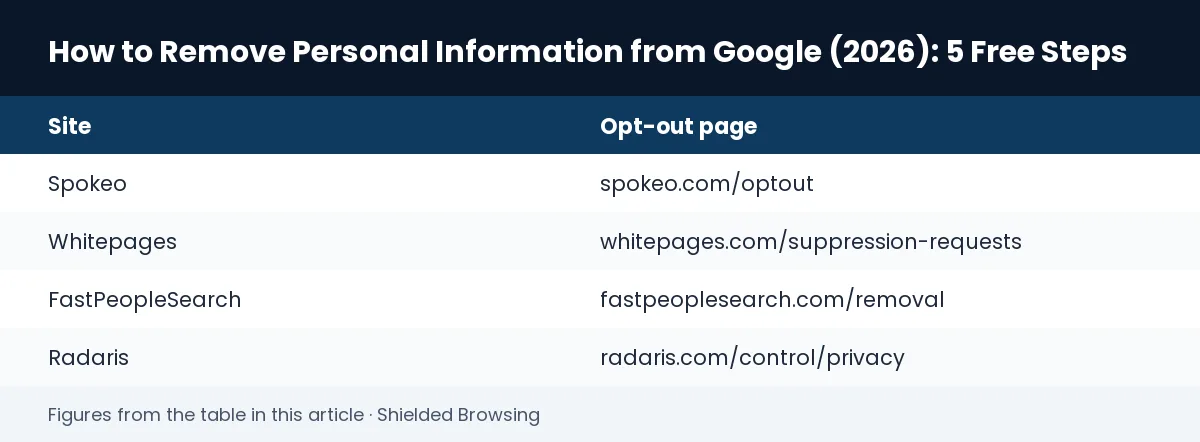
Most people-search sites have a free opt-out page. They usually ask you to find your own listing, paste its URL and confirm by email. These are the opt-out pages for some of the largest sites, each one confirmed live on October 21, 2026:
| Site | Opt-out page |
|---|---|
| Spokeo | spokeo.com/optout |
| Whitepages | whitepages.com/suppression-requests |
| FastPeopleSearch | fastpeoplesearch.com/removal |
| Radaris | radaris.com/control/privacy |
Two practical tips. First, use a separate email address for opt-out confirmations, because some sites keep the address you give them. Second, never pay a people-search site to remove you. The opt-outs above are free.
If you live in California, use DROP
California’s Delete Request and Opt-out Platform (DROP) launched on January 1, 2026. Per the state’s page, one free request goes to over 600 registered data brokers once you verify you are a California resident. Brokers had to start processing requests on August 1, 2026, and the state says it can take up to 90 days for your status to update. DROP covers registered data brokers, which is not the same list as the people-search sites above, so do both. Outside California there is no single free federal equivalent.
Ask the site owner directly
For anything that isn’t a people-search site, such as an old forum post, a cached résumé or a former employer’s staff page, email the site owner and ask for the page to be removed or edited. Once it’s gone, move on to Step 4.
Step 4: Clear stale results with “Refresh outdated content”
After a site deletes or edits a page, Google can keep showing the old snippet until it recrawls the page. Google’s Refresh outdated content tool fixes that. It works for anyone; you don’t need to own the site.
- Open the tool and choose the Page tab.
- Paste the URL of the page that has already been removed or changed.
- Select Submit, and check its status later in the same tool.
For an image, search for it on Google Images, right-click the thumbnail, copy the link address, then start a new Image request in the tool. Google’s help page only frames the tool for content that has already been taken down or changed on the live page. If the information is still on the page, this tool won’t help; go back to Step 2 or Step 3.
Step 5: Decide whether a paid removal service is worth it
Doing Steps 1 to 4 yourself is free, and the only independent measurement we know of favours it. In Consumer Reports’ 2024 study, manual opt-outs removed about 70% of tracked people-search profiles, more than any paid service in the test. The catch is time. There are hundreds of brokers, and listings come back, so the job never really ends.
A paid service is a way to buy that time back. These are the entry-level plans, read on each company’s pricing page on October 21, 2026:
| Service | Entry plan, billed yearly | Stated coverage | Free option |
|---|---|---|---|
| Optery Core | $39/yr | 380+ sites | Yes (exposure scan) |
| Incogni Standard | $95.88/yr | 420+ brokers | No |
| DeleteMe 1 person | $129/yr | “All major” brokers, quarterly reports | No |
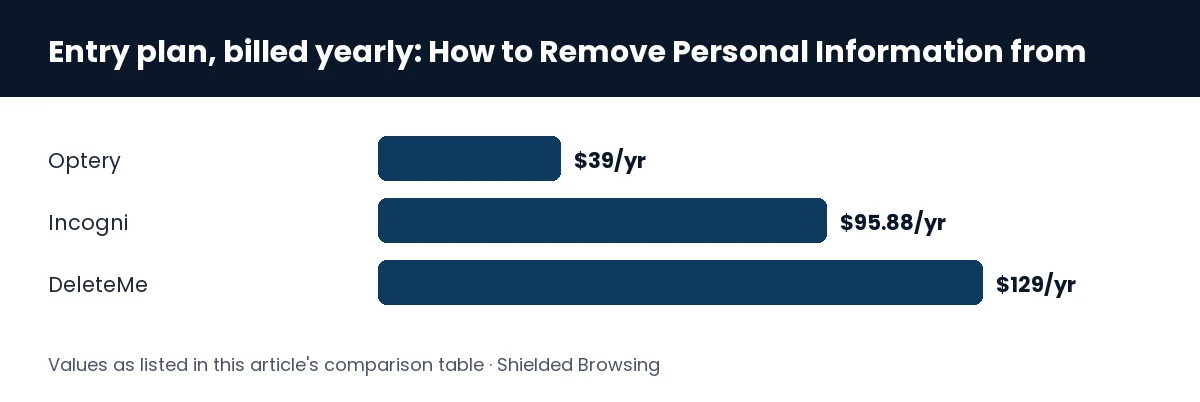
Higher tiers cover more sites. Optery Ultimate is $249 a year for 625+ sites. Incogni Unlimited is $179.88 a year and adds custom removal requests. DeleteMe charges $229 a year for two people and $329 for four. For how these compare on the evidence, read our Incogni vs DeleteMe vs Optery comparison and the full best data removal services ranking.
Who should pay: people who have been doxxed or harassed, people whose address being public is a real safety issue, and anyone who has tried the manual route and won’t keep it up. Who can skip it: anyone willing to spend an afternoon on Steps 1 to 4 and a few minutes every couple of months on a recheck, especially Californians with DROP available.
Common mistakes to avoid
- Only asking Google. The result goes away and the listing stays on the site, ready to be re-indexed or show up elsewhere. Always pair a Google removal with a source opt-out.
- Doing it once. Brokers re-list. Keep “Results about you” monitoring on and recheck the big people-search sites every few months.
- Using “Refresh outdated content” too early. It only helps after the page itself has changed. Submitting a live page wastes the request.
- Paying a people-search site to “suppress” your profile. Their opt-outs are free. A paid “removal” offer from the broker itself is a red flag.
- Leaving the doors open. Removal treats the symptom. Fewer data leaks in the first place comes from basic hygiene: unique passwords in a password manager, a locked-down home network, and the habits in our guide to staying anonymous online.
FAQ
Can I remove my address from Google for free?
Yes. Add it in “Results about you” and request removal of the results it finds, or use Google’s removal request form. Both are free. Then opt out of the site that published the address, also free.
How long does Google take to remove personal information?
Google says “Results about you” notifications and request confirmations arrive within a few hours, and there can be a further delay between approval and the result disappearing. Google doesn’t publish a fixed review time for form requests.
Does removing a result delete the information from the internet?
No. Google’s help page says removal “doesn’t mean that the info is gone from the internet.” Only the site owner can delete the page itself.
Will Google remove a news article about me?
Usually not. Google says it might not remove content about something “important or newsworthy,” and it doesn’t remove results from newspapers, government or educational sites under “Results about you.” Ask the publisher, or see Google’s legal removal options if local law applies.
Is a data removal service better than doing it myself?
Not on the one independent test we know of: Consumer Reports found manual opt-outs removed the most profiles. A service saves time and keeps rechecking for you. Read our Incogni, Optery and DeleteMe reviews before you buy.
Bottom line
To remove personal information from Google, turn on “Results about you” today, opt out of the people-search sites that are the real source, and clear stale snippets with the outdated-content tool. That covers most cases for free. Pay for a service only if your situation is serious or you know you won’t keep the manual routine going.
This page is for information, not legal or security advice. If you are being threatened or stalked, contact local law enforcement as well as taking these steps.
About the author
Lennit Herrera is the founder and editor of Shielded Browsing. Every guide here is researched and published by one named, accountable person. We do not run hands-on lab tests. Figures come from providers’ published material or named third-party sources, and each is dated. Corrections are welcome at hello@shieldedbrowsing.com. More about Shielded Browsing →