Security Key vs Authenticator App (2026): Which 2FA Stops Phishing?
Disclosure: the security key links on this page are Amazon affiliate links. If you buy through them we may earn a commission at no extra cost to you. Authenticator apps are free and none of them pays us. See our affiliate disclosure. As an Amazon Associate we earn from qualifying purchases.
By Lennit Herrera, founder and editor, Shielded Browsing · Last updated November 6, 2026
The short answer: in the security key vs authenticator app choice, a hardware security key is the stronger option because it cannot be phished: it checks the website’s real address before it answers, so a fake login page gets nothing it can reuse. An authenticator app’s six-digit code can be typed into a fake page and replayed by an attacker within its 30-second window. That is why CISA, the US cybersecurity agency, calls FIDO/WebAuthn security keys the “gold standard” and ranks authenticator apps one step below. An authenticator app is still far better than SMS codes, costs nothing, and is the right second factor on accounts that don’t accept keys. For most people the best setup is both: two security keys on your email, password manager and financial accounts, and an app everywhere else.
How we sourced this page: the security rankings come from CISA’s “Implementing Phishing-Resistant MFA” fact sheet (October 2022), NIST’s digital identity guidelines (SP 800-63B, revision 4) and Google’s 2019 account-security research, all linked below. Key prices were read on Yubico’s store on November 6, 2026, and Google Titan and Token2 prices on their makers’ pages on November 5, 2026. App features were read on Google’s and Bitwarden’s own pages on November 6, 2026. We do not run our own attack tests, so this page makes no detection or success-rate claims of its own.
On this page
- Security key vs authenticator app: quick comparison
- How each one works
- Phishing: the difference that matters
- SIM swaps, push bombing and malware
- Cost
- Losing a key or a phone
- Where passkeys fit
- Which should you use?
- FAQ
Security Key vs Authenticator App: Quick Comparison
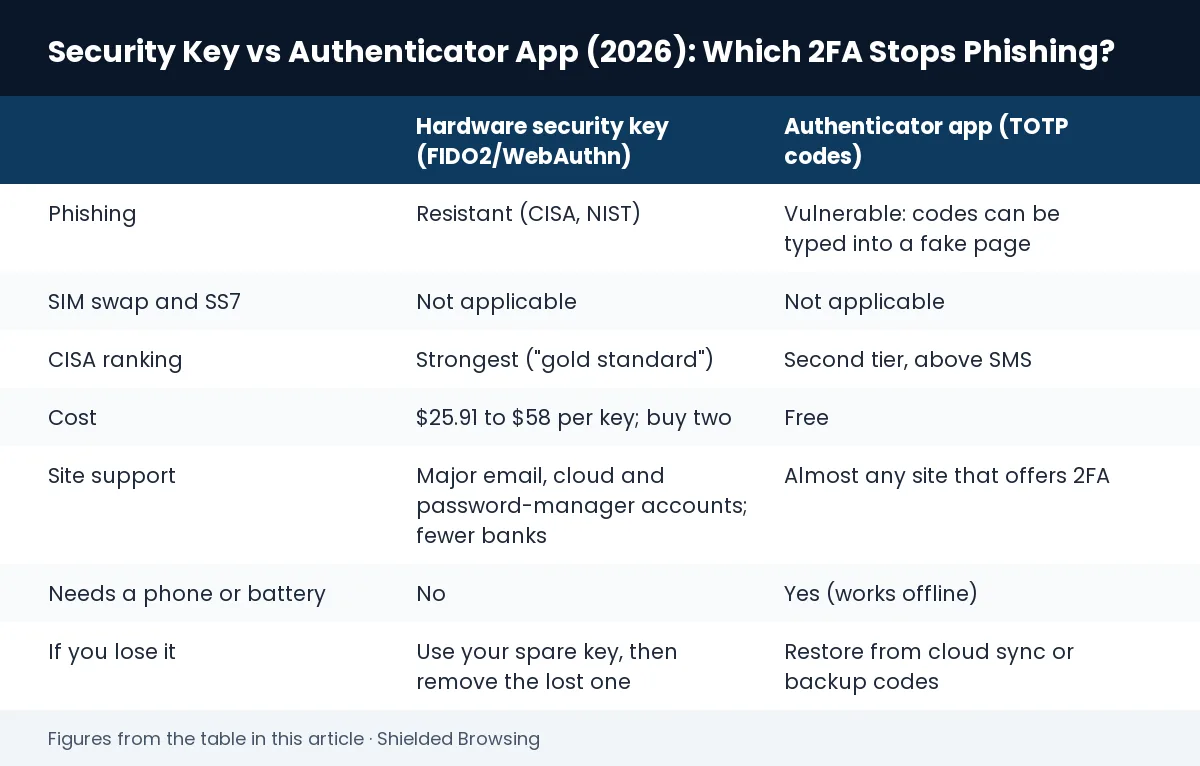
| Hardware security key (FIDO2/WebAuthn) | Authenticator app (TOTP codes) | |
|---|---|---|
| Phishing | Resistant (CISA, NIST) | Vulnerable: codes can be typed into a fake page |
| SIM swap and SS7 | Not applicable | Not applicable |
| CISA ranking | Strongest (“gold standard”) | Second tier, above SMS |
| Cost | $25.91 to $58 per key; buy two | Free |
| Site support | Major email, cloud and password-manager accounts; fewer banks | Almost any site that offers 2FA |
| Needs a phone or battery | No | Yes (works offline) |
| If you lose it | Use your spare key, then remove the lost one | Restore from cloud sync or backup codes |
How Each One Works
Authenticator apps
An authenticator app such as Google Authenticator stores a secret that the website gave you when you scanned its QR code. The app and the site both run that secret through the same formula with the current time, so they produce the same six-digit code, which changes every 30 seconds. Google’s help page says its app generates codes without an internet connection or mobile service, and that you can sign in to your Google Account in the app to sync codes across devices; without an account, codes stay on that one phone until you export them by QR code. Password managers can generate the same codes: Bitwarden includes an integrated authenticator in its Premium plan, billed at $19.80 a year on its pricing page.
Hardware security keys
A security key is a small USB or NFC device that holds a private key that never leaves it. When you sign in, the website sends a challenge; the key signs it, but only for the website it was registered with, and you confirm by touching the key (some models also ask for a PIN or fingerprint). The standards behind this are FIDO2 and WebAuthn, built into Chrome, Safari, Edge and Firefox and into Windows, macOS, Android and iOS. There is nothing to type and nothing to read off a screen.
Phishing: The Difference That Matters
This is the whole argument. CISA’s fact sheet describes the common phishing attack directly: an email leads you to a fake copy of a login page, and you enter your username, your password and “the 6-digit code from their mobile phone’s authenticator app.” The attacker relays all three to the real site within seconds and is in. NIST’s guidelines say the same thing in standards language: one-time-password authentication “is not phishing-resistant,” and codes you type by hand shall not be treated as phishing-resistant.
A security key closes that gap because it checks which website is asking. NIST calls this verifier name binding and names WebAuthn as the example: the key’s answer is tied to the real site’s domain, so a look-alike domain gets a refusal, not a reusable code. You can’t be tricked into handing it over, because you never handle anything.
Google’s own account data points the same way. In its 2019 account-security research, an on-device prompt blocked 99% of bulk phishing attacks and 90% of targeted attacks, and an SMS code 96% and 76%; Google reported that “zero users that exclusively use security keys fell victim to targeted phishing” during the investigation. Those figures are Google’s, from 2019, and Google did not publish separate numbers for authenticator-app codes.
SIM Swaps, Push Bombing and Malware
SIM swaps and SS7. Both methods beat this one. CISA lists SIM swap and SS7 attacks, which steal codes sent by text message or voice call, as “not applicable” to app-based authenticators and to security keys. If you are moving off SMS codes, either choice fixes that problem.
Push bombing. Some apps send a “Was this you?” prompt instead of a code. CISA warns that attackers send prompt after prompt until a tired user taps Approve, and recommends number matching, where you type a number shown on the login screen into the app. Plain six-digit code apps don’t have this weakness, and security keys need a physical touch at the device you are signing in on.
Malware on your phone or computer. Neither method rescues a device that is already compromised: malware that steals a logged-in session cookie can skip the login entirely. That is a reason to keep your devices updated, not a reason to skip a second factor. Our guide to securing your home network covers the basics.
Cost
Authenticator apps are free. Security keys are a one-time purchase, and you should buy two so one can live in a drawer as a spare. Apple won’t let you turn on Apple Account security keys with fewer than two, and Google tells users to keep a backup key in a safe place.
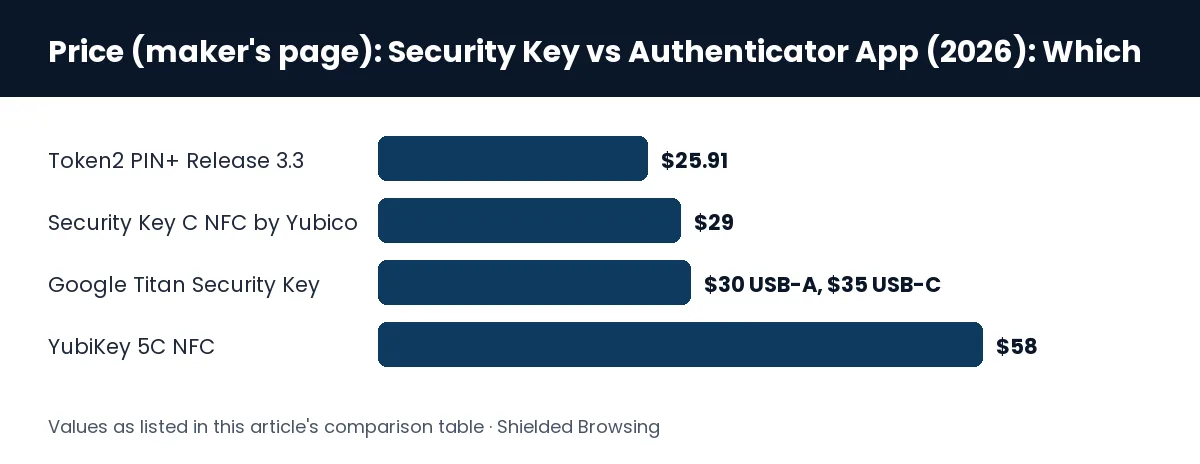
| Key | Price (maker’s page) | Pair of two | Good for |
|---|---|---|---|
| Token2 PIN+ Release 3.3 | $25.91 | $51.82 | Lowest price, 300 passkey slots |
| Security Key C NFC by Yubico | $29 | $58 | FIDO-only logins at a low price |
| Google Titan Security Key | $30 USB-A, $35 USB-C | $60 to $70 | 250+ passkeys |
| YubiKey 5C NFC | $58 | $116 | Every protocol, Apple Account by model |
Our best hardware security keys guide compares seven keys by connector, protocols and passkey capacity. If you just want a sensible starting pair, two Security Key C NFCs cost $58 at Yubico’s list price, and a YubiKey 5C NFC adds smart-card and OpenPGP support if you need it. Amazon prices can differ from the maker’s list price.
Losing a Key or a Phone
Recovery is where people get locked out, so plan it before you need it.
- Security keys: register both keys on every account the day you buy them, keep one somewhere safe at home, and save each account’s backup codes on paper or in your password manager. If a key goes missing, sign in with the spare and remove the lost key from each account’s security settings.
- Authenticator apps: the risk is a lost or wiped phone. Google Authenticator can sync codes to your Google Account; if you don’t use sync, export your codes by QR code to the new phone before you reset the old one, and keep each site’s backup codes. A password manager that stores codes moves them with your vault.
One trade-off worth knowing: syncing authenticator codes to a cloud account is convenient, but it means anyone who takes over that cloud account gets the codes too. Protect that account with a security key.
Where Passkeys Fit
A passkey is the same FIDO2/WebAuthn sign-in a security key uses, but stored in your phone, computer or password manager instead of on a separate device. Passkeys keep the phishing resistance, because the browser still checks the site, and many sites now let you use one in place of a password. NIST allows synced passkeys for everyday accounts (its AAL1 and AAL2 levels) but says syncable authenticators shall not be used at AAL3, its highest level, because the private key can be copied to other devices. In plain terms: a passkey in your password manager is a big upgrade over an app code, and a hardware key is still the strictest option for the accounts that matter most. Our best password managers guide covers which managers store passkeys.
Which Should You Use?
Use security keys if you can lose real money or your identity through one account: your main email (it resets every other password), your password manager, your Apple or Google account, and any financial or crypto account that accepts keys. Public figures, journalists, small-business owners who handle payments, and anyone who has already been targeted should start here. Google’s Advanced Protection Program, built for high-risk users, accepts any FIDO-compliant security key, such as Google’s own Titan key.
Use an authenticator app if the site doesn’t support keys, or for lower-stakes accounts where you just want to stop password-reuse attacks. It is free, quick to set up, and a large step up from SMS.
The setup we recommend for most people: two keys on your email, password manager and cloud account; an authenticator app (or your password manager’s built-in authenticator) on everything else; SMS turned off anywhere a better option exists; and backup codes saved for every account. If you are choosing a manager for that, our Bitwarden vs 1Password comparison covers price and 2FA support side by side.
Security key: strengths and limits
- Phishing-resistant by design (CISA, NIST)
- No phone, battery or signal needed
- One touch, nothing to type
- Costs $25.91 to $58 a key, and you need two
- Not every site supports it, and fewer banks do
Authenticator app: strengths and limits
- Free and supported almost everywhere
- Immune to SIM swaps, unlike SMS
- Works offline
- Codes can be phished on a fake login page
- A lost phone without sync or backup codes can lock you out
Frequently asked questions
Is a security key more secure than an authenticator app?
Yes, against phishing. CISA ranks FIDO/WebAuthn security keys as the strongest form of multi-factor authentication and app-based codes one level below, because a code can be entered on a fake login page and a key’s response can’t be reused on a different site. Against SIM swaps, both are equally safe.
Can an authenticator app be hacked?
The app itself rarely is. The usual attack is tricking you into typing the current code into a fake login page, which the attacker then uses on the real site within the 30-second window. Malware on your phone, or a takeover of the cloud account your codes sync to, are the other risks.
Do I need two security keys?
Yes. Apple requires at least two to turn on Apple Account security keys, and Google advises keeping a backup key in a safe place. Register both on every account so a lost key never locks you out.
Can I use a security key and an authenticator app on the same account?
On most major services, yes: you can usually add several second-factor methods to one account. The account is only as strong as the weakest method on it, though, so remove SMS once your key and app are set up.
Is a passkey the same as a security key?
They use the same FIDO2/WebAuthn standard and both resist phishing. A passkey is usually stored in your phone, computer or password manager and can sync between devices; a hardware key keeps the credential on one physical device that can’t be copied, which is why NIST reserves its highest assurance level for authenticators that can’t be synced.
What if a site doesn’t support security keys?
Use an authenticator app there, and save the backup codes. If a site offers both SMS and app codes, pick the app.
Our Verdict
A security key beats an authenticator app on the one attack that defeats most 2FA, the fake login page, and it does it without asking you to spot the fake. That makes two keys worth roughly $52 to $116 for the handful of accounts that protect everything else. An authenticator app remains the right tool for the long tail of sites that don’t accept keys, and it is a clear step up from text-message codes. Use both, and keep your backup codes somewhere you can find them.
Sources: CISA, Implementing Phishing-Resistant MFA (October 2022) · NIST SP 800-63B, revision 4 · Google Security Blog, May 17, 2019 · Google Authenticator help · Yubico store · Bitwarden pricing